> ## Documentation Index
> Fetch the complete documentation index at: https://docs.upsolve.ai/llms.txt
> Use this file to discover all available pages before exploring further.
# Favorites
> Save a chart or query from a chat, come back to it later, and pick the conversation back up.
Charts an agent builds in chat are ephemeral by default — they live in the conversation and disappear with it. **Favorites** is how an end user keeps one.
Favorites is currently marked **Beta** in the product.
## Saving a favorite
Two things can be favorited, and both are saved from the answer itself:
* **A chart** — click **Add to favorites** beneath any chart the agent rendered.
* **A SQL result** — expand **Details** under an answer and click **Add to favorites** next to the query.
A short dialog asks for a name, pre-filled from the chart's title or a snippet of the SQL. Naming it well matters, because the name is how the user finds it again — and how they reference it in a later question.
 Saving a favorite captures more than the picture:
* The **chart configuration** — type, axes, formatting — so it renders the same way next time.
* The **SQL** behind it, so it can be re-run against live data.
* A **snapshot** of the rows as they were at save time, so the favorite can also be shown frozen.
* A link back to the **conversation** it came from.
That last one is the important one, and the rest of this page is about what it enables.
## The Favorites view
**Favorites** in the left sidebar lists everything the user has saved, as cards with a chart thumbnail, the name, and the type. A search box filters by name. Each card can be removed, with a confirmation step.
Saving a favorite captures more than the picture:
* The **chart configuration** — type, axes, formatting — so it renders the same way next time.
* The **SQL** behind it, so it can be re-run against live data.
* A **snapshot** of the rows as they were at save time, so the favorite can also be shown frozen.
* A link back to the **conversation** it came from.
That last one is the important one, and the rest of this page is about what it enables.
## The Favorites view
**Favorites** in the left sidebar lists everything the user has saved, as cards with a chart thumbnail, the name, and the type. A search box filters by name. Each card can be removed, with a confirmation step.
 ## Using a favorite in a new question
Favorites aren't just an archive. Typing `@` in the chat input opens a picker of the user's saved favorites; selecting one inserts `@FavoriteName` into the message. The agent then has that chart or query as context for the new question — *"break `@Revenue by region` down by product"* works without re-establishing what "revenue by region" meant.
If a user has no favorites yet, the picker says so and points them at saving a chart or SQL result from chat first.
## Using a favorite in a new question
Favorites aren't just an archive. Typing `@` in the chat input opens a picker of the user's saved favorites; selecting one inserts `@FavoriteName` into the message. The agent then has that chart or query as context for the new question — *"break `@Revenue by region` down by product"* works without re-establishing what "revenue by region" meant.
If a user has no favorites yet, the picker says so and points them at saving a chart or SQL result from chat first.
 ## Revisiting the conversation behind a favorite
Clicking a favorite card opens the **Session Context** sidebar: the full conversation that produced it, with its date and duration, exactly as it happened.
## Revisiting the conversation behind a favorite
Clicking a favorite card opens the **Session Context** sidebar: the full conversation that produced it, with its date and duration, exactly as it happened.
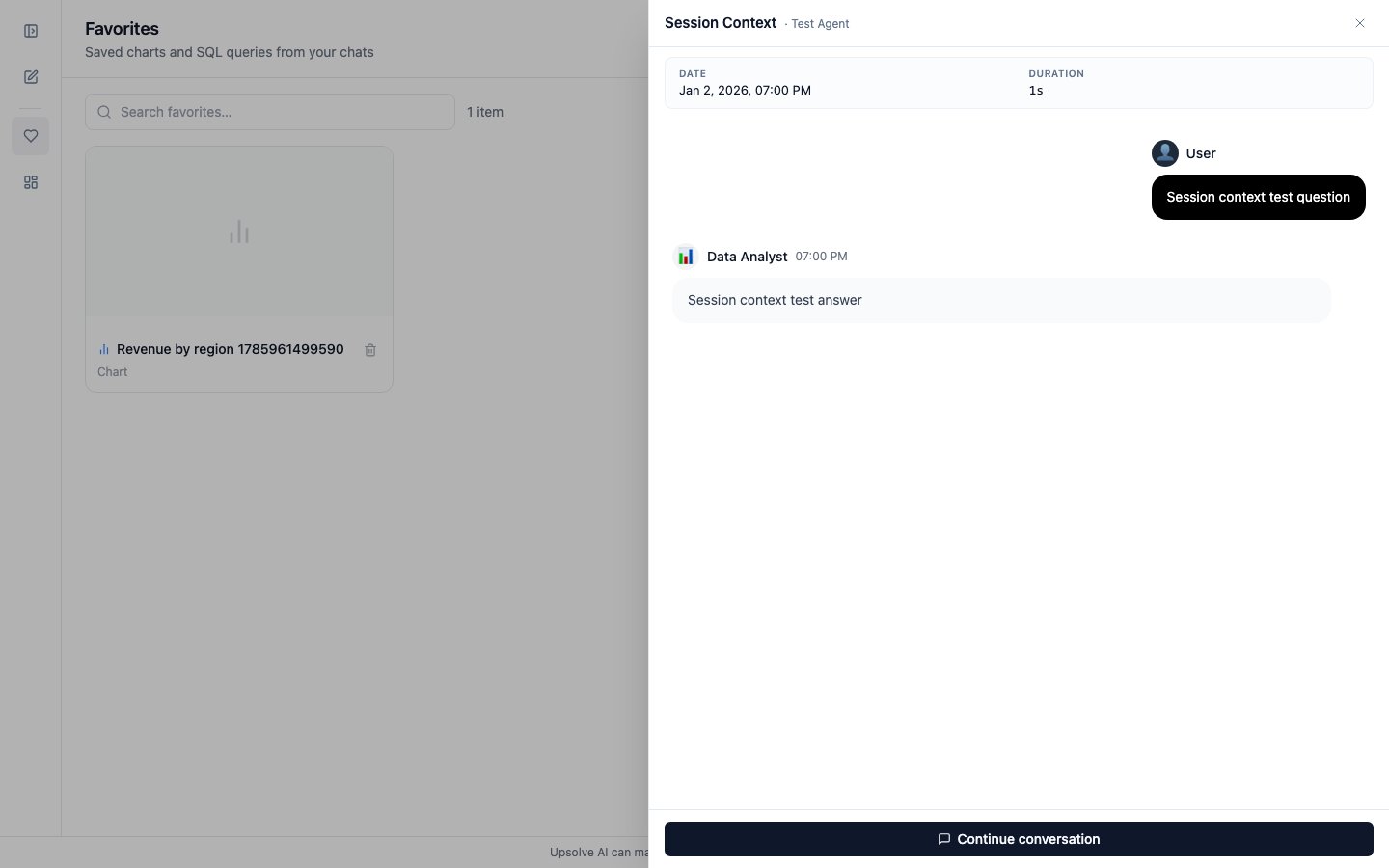 This answers the question that always follows a saved chart — *"wait, what exactly was this measuring?"* — without anyone having to remember. And from the bottom of that sidebar the user can carry on:
**Continue conversation** — shown when the viewer is the person who had the original conversation. The thread resumes with all of its context intact: the agent still knows what was filtered, what was compared, and what was already ruled out. The user keeps asking as if they never left.
**Fork conversation** — shown when the viewer is *not* the original participant. Someone else's analysis is not theirs to edit, so instead they get a copy: the full thread is cloned under a new conversation ID belonging to them, and they continue from there. The original is untouched, and its owner sees nothing change.
This is the mechanism that makes a saved analysis reusable across a team. One person does the investigation; anyone who later finds the result can fork it and take it in their own direction, starting from all the context the first person built up rather than from an empty chat box.
This answers the question that always follows a saved chart — *"wait, what exactly was this measuring?"* — without anyone having to remember. And from the bottom of that sidebar the user can carry on:
**Continue conversation** — shown when the viewer is the person who had the original conversation. The thread resumes with all of its context intact: the agent still knows what was filtered, what was compared, and what was already ruled out. The user keeps asking as if they never left.
**Fork conversation** — shown when the viewer is *not* the original participant. Someone else's analysis is not theirs to edit, so instead they get a copy: the full thread is cloned under a new conversation ID belonging to them, and they continue from there. The original is untouched, and its owner sees nothing change.
This is the mechanism that makes a saved analysis reusable across a team. One person does the investigation; anyone who later finds the result can fork it and take it in their own direction, starting from all the context the first person built up rather than from an empty chat box.
 Which of the two buttons appears is decided from thread ownership, not from a setting. In Agent Studio a builder is always treated as the owner, so they can continue any conversation they're inspecting.
## What the builder sees
A favorite is a strong quality signal: the user is telling you this specific answer was worth keeping. Those are the best candidates for [Golden Charts](/ai-agent-builder/golden-assets) — an answer a real user chose to save is, by definition, a validated example of how that question should be answered.
The conversation behind a favorite is an ordinary conversation, so it appears in [Chat History](/ai-agent-builder/chat-history) with its full [observability trace](/ai-agent-builder/agent-observability).
## Next steps
Arrange favorites into a board and share it.
Promote a favorited answer into a reference the agent retrieves.
Which of the two buttons appears is decided from thread ownership, not from a setting. In Agent Studio a builder is always treated as the owner, so they can continue any conversation they're inspecting.
## What the builder sees
A favorite is a strong quality signal: the user is telling you this specific answer was worth keeping. Those are the best candidates for [Golden Charts](/ai-agent-builder/golden-assets) — an answer a real user chose to save is, by definition, a validated example of how that question should be answered.
The conversation behind a favorite is an ordinary conversation, so it appears in [Chat History](/ai-agent-builder/chat-history) with its full [observability trace](/ai-agent-builder/agent-observability).
## Next steps
Arrange favorites into a board and share it.
Promote a favorited answer into a reference the agent retrieves.