> ## Documentation Index
> Fetch the complete documentation index at: https://docs.upsolve.ai/llms.txt
> Use this file to discover all available pages before exploring further.
# Knowledge Base
> Store reference documents the agent searches on demand to interpret your terms, rules, and policies.
The Knowledge Base is available for orgs on the skills + persistent-memory architecture.
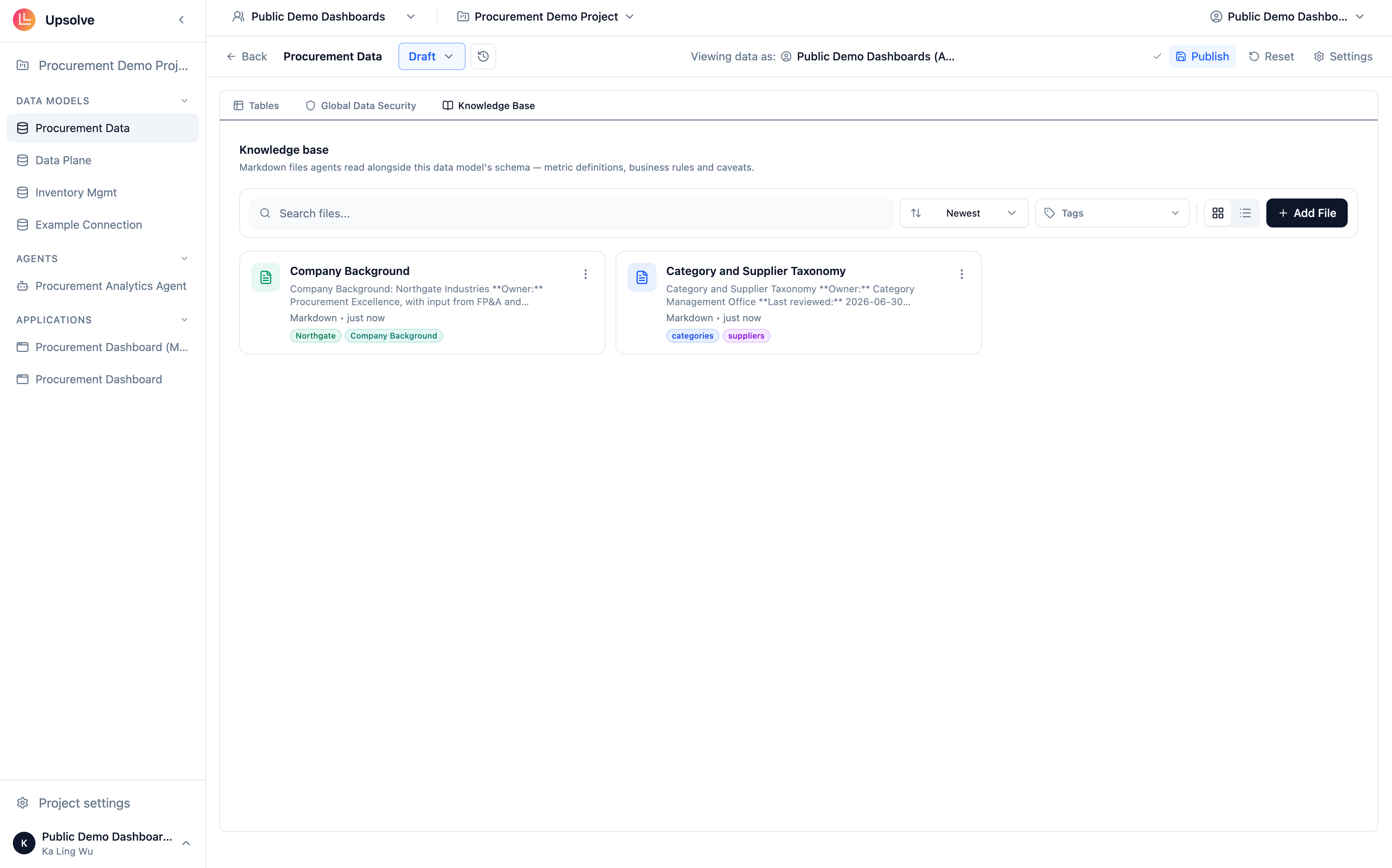
The Knowledge Base is a tab in the Data Model editor — alongside **Tables** and **Global Data Security** — that holds reference documents the agent must read before it can interpret your business correctly: definitions, business rules, policies, company background, and known caveats about the data.
It answers a different need than [System Prompts](/ai-agent-builder/system-prompts). A system prompt is a compact set of rules the agent applies on **every** message. The Knowledge Base is a library of reference material the agent **searches on demand** — long-form documents that would swamp a system prompt but are invaluable when a question touches them. If your refund policy is two pages long, it belongs in the Knowledge Base, not the system prompt.
 ## Adding files
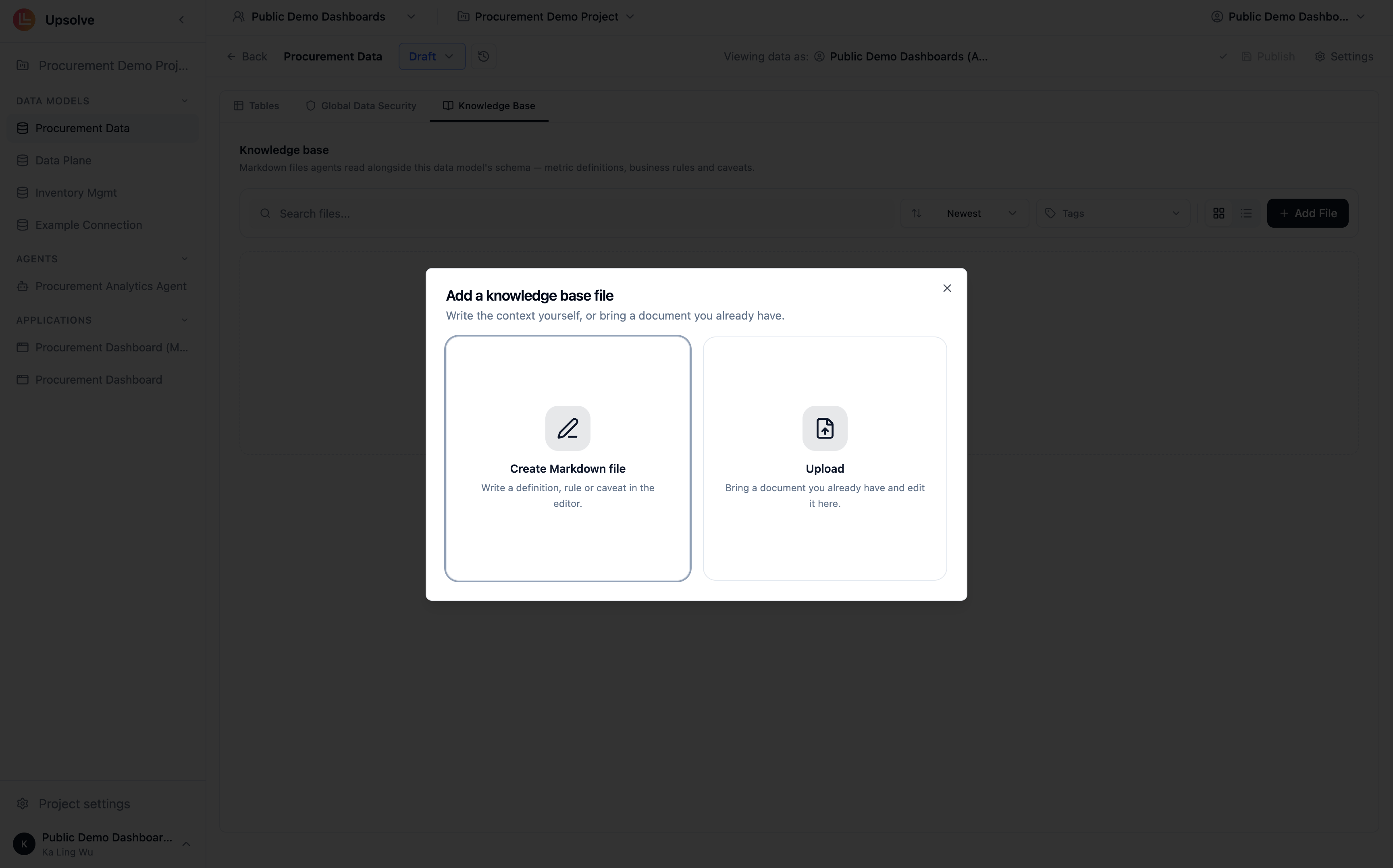
Files can be added two ways from the Knowledge Base tab:
**Create inline** — write a new document directly in the built-in markdown editor. Best for definitions and rules you're authoring for the agent in the first place.
**Upload** — drop in existing `.md`, `.txt`, or `.docx` files. Uploads are converted to Markdown so that every file is editable in the same editor, diffable between versions, and readable by agents without a parser. The original file is not stored.
## Adding files
Files can be added two ways from the Knowledge Base tab:
**Create inline** — write a new document directly in the built-in markdown editor. Best for definitions and rules you're authoring for the agent in the first place.
**Upload** — drop in existing `.md`, `.txt`, or `.docx` files. Uploads are converted to Markdown so that every file is editable in the same editor, diffable between versions, and readable by agents without a parser. The original file is not stored.
 Organize files with **tags** so related documents stay grouped as the library grows.
## What belongs in the Knowledge Base
* **Definitions** — the canonical meaning of terms users will use loosely ("gross margin", "active account", "churn")
* **Business rules and policies** — refund windows, SLA tiers, pricing rules the agent should cite rather than guess
* **Company background** — how the business is structured, what entities relate to what
* **Data caveats** — "the `legacy_orders` table stops at March 2024", "EMEA revenue excludes partner channels"
The test is: would the agent need to **read** this to interpret a term correctly? If yes, it belongs here. If it's a short rule that must always apply without being looked up, it belongs in the [system prompt](/ai-agent-builder/system-prompts) instead.
## Versioning
The Knowledge Base is version-aware, just like the rest of the data model. There is one working copy per data model, and writes land on the **draft** version. Files are checkpointed when you publish a data model version, so every published version carries the exact set of documents the agent had at that point — and edits never silently alter a version that's live in production. See [Data Model & Schema](/ai-agent-builder/data-model-schema) for how draft and production versions work.
## How the agent uses it
At chat time, the agent doesn't preload your Knowledge Base. It reaches in with two tools:
* `search_context_files` — finds files relevant to the user's question
* `read_context_file` — reads a specific file's contents in full
So the cost of a large library is low: documents only enter the agent's context when retrieval says they're relevant. This is also why descriptive file names and good tagging matter — they improve what retrieval surfaces.
## Next steps
The foundation the Knowledge Base sits in — tables, columns, descriptions, and versioning.
Package procedures and conventions the agent loads on demand.
Short, always-on rules that apply to every message.
Example questions with trusted SQL and charts, retrieved by similarity.
Organize files with **tags** so related documents stay grouped as the library grows.
## What belongs in the Knowledge Base
* **Definitions** — the canonical meaning of terms users will use loosely ("gross margin", "active account", "churn")
* **Business rules and policies** — refund windows, SLA tiers, pricing rules the agent should cite rather than guess
* **Company background** — how the business is structured, what entities relate to what
* **Data caveats** — "the `legacy_orders` table stops at March 2024", "EMEA revenue excludes partner channels"
The test is: would the agent need to **read** this to interpret a term correctly? If yes, it belongs here. If it's a short rule that must always apply without being looked up, it belongs in the [system prompt](/ai-agent-builder/system-prompts) instead.
## Versioning
The Knowledge Base is version-aware, just like the rest of the data model. There is one working copy per data model, and writes land on the **draft** version. Files are checkpointed when you publish a data model version, so every published version carries the exact set of documents the agent had at that point — and edits never silently alter a version that's live in production. See [Data Model & Schema](/ai-agent-builder/data-model-schema) for how draft and production versions work.
## How the agent uses it
At chat time, the agent doesn't preload your Knowledge Base. It reaches in with two tools:
* `search_context_files` — finds files relevant to the user's question
* `read_context_file` — reads a specific file's contents in full
So the cost of a large library is low: documents only enter the agent's context when retrieval says they're relevant. This is also why descriptive file names and good tagging matter — they improve what retrieval surfaces.
## Next steps
The foundation the Knowledge Base sits in — tables, columns, descriptions, and versioning.
Package procedures and conventions the agent loads on demand.
Short, always-on rules that apply to every message.
Example questions with trusted SQL and charts, retrieved by similarity.