> ## Documentation Index
> Fetch the complete documentation index at: https://docs.upsolve.ai/llms.txt
> Use this file to discover all available pages before exploring further.
# MCP as Context Source
> Connect external tools and live systems to your agent as real-time context via the Model Context Protocol.
The context entry points covered so far all encode knowledge **ahead of time** — your schema, your rules, your documents, your examples. But some context lives in other systems and changes constantly: a CRM's account state, a ticketing queue, a status page, an internal service. The [Model Context Protocol](https://modelcontextprotocol.io/) (MCP) is an open standard for connecting exactly those systems to an AI agent, and your Upsolve agent can call external MCP servers at chat time to pull that live context into its answers.
 ## Where MCP fits among the entry points
Each context entry point answers a different question:
| Entry point | Answers |
| -------------------------------------------------- | -------------------------------------------------------------- |
| [Data Model](/ai-agent-builder/data-model-schema) | What does your warehouse data look like and what does it mean? |
| [System Prompts](/ai-agent-builder/system-prompts) | What rules always apply? |
| [Golden Assets](/ai-agent-builder/golden-assets) | How has your team answered this before? |
| [Skills](/ai-agent-builder/skills) | What procedures should the agent follow? |
| [Knowledge Base](/ai-agent-builder/knowledge-base) | What documents explain your terms and policies? |
| [User Memory](/ai-agent-builder/user-memory) | What does this user prefer? |
| **MCP** | What's true **right now** in systems outside your warehouse? |
MCP is the entry point for anything the agent should fetch live rather than be told in advance. A question like "are there any open incidents affecting this customer?" can't be answered from your data model — but an MCP connector to your incident tracker can.
## Managing connectors
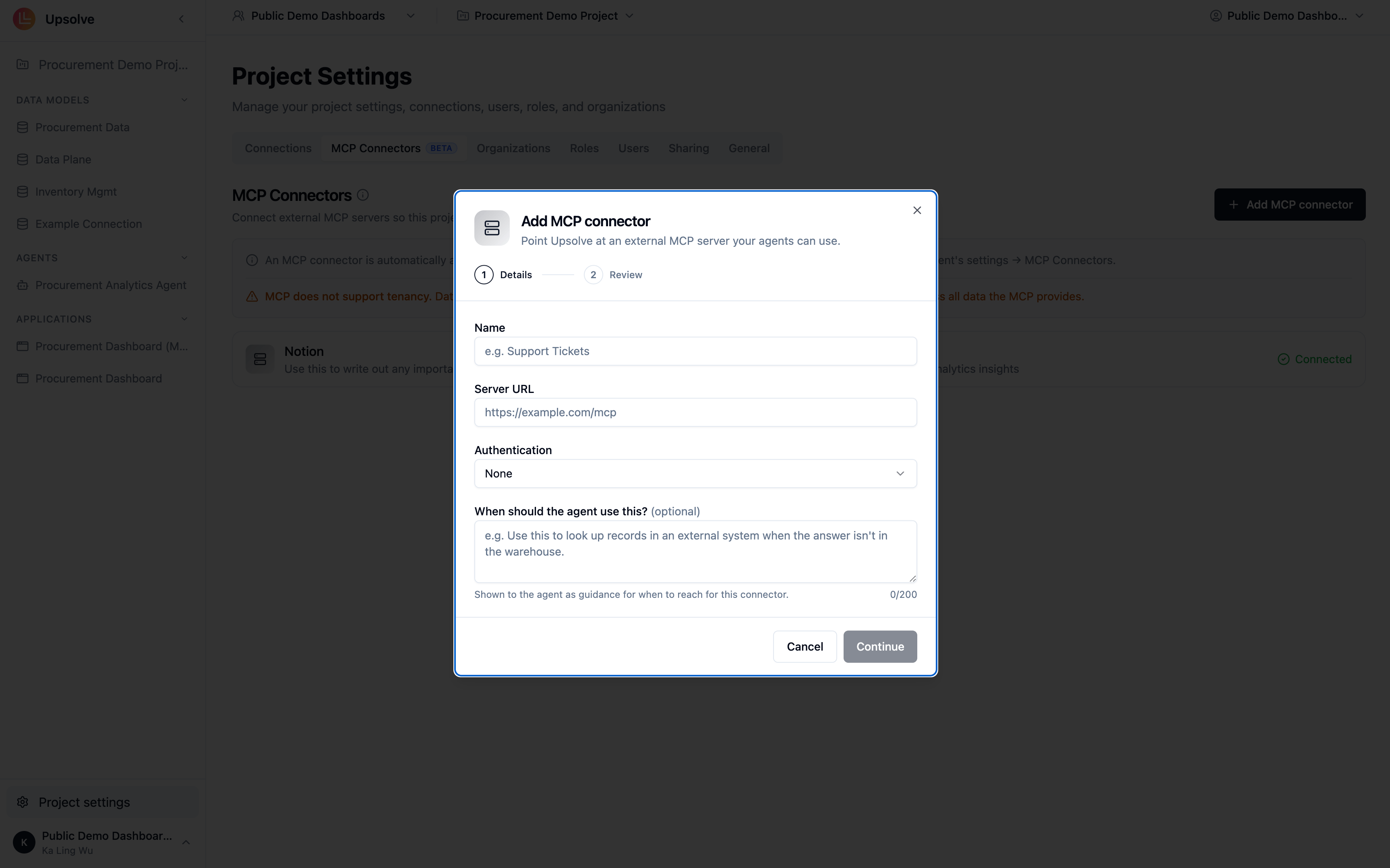
MCP connectors are configured at the **project level** (Project Settings → MCP Connectors) and are **enabled for every agent by default**. In an agent's own **MCP Connectors** tab you can turn specific connectors off for that agent version — useful when a connector's tools would be noise for a narrowly scoped agent. Connector changes are draft-scoped: they take effect once the agent version is saved.
## The other direction: exposing Upsolve over MCP
This page is about MCP as a way to bring external context **into** your agent. Upsolve also uses MCP in the opposite direction — exposing **your agent** to MCP clients. Those are deployment topics, covered in their own guides:
Explore your own data in Claude, with charts rendered in the conversation.
Expose your agent to end users or your own agent, scoped per user by token.
## Next steps
Store static reference documents the agent searches on demand.
Package procedures the agent follows once live context arrives.
## Where MCP fits among the entry points
Each context entry point answers a different question:
| Entry point | Answers |
| -------------------------------------------------- | -------------------------------------------------------------- |
| [Data Model](/ai-agent-builder/data-model-schema) | What does your warehouse data look like and what does it mean? |
| [System Prompts](/ai-agent-builder/system-prompts) | What rules always apply? |
| [Golden Assets](/ai-agent-builder/golden-assets) | How has your team answered this before? |
| [Skills](/ai-agent-builder/skills) | What procedures should the agent follow? |
| [Knowledge Base](/ai-agent-builder/knowledge-base) | What documents explain your terms and policies? |
| [User Memory](/ai-agent-builder/user-memory) | What does this user prefer? |
| **MCP** | What's true **right now** in systems outside your warehouse? |
MCP is the entry point for anything the agent should fetch live rather than be told in advance. A question like "are there any open incidents affecting this customer?" can't be answered from your data model — but an MCP connector to your incident tracker can.
## Managing connectors
MCP connectors are configured at the **project level** (Project Settings → MCP Connectors) and are **enabled for every agent by default**. In an agent's own **MCP Connectors** tab you can turn specific connectors off for that agent version — useful when a connector's tools would be noise for a narrowly scoped agent. Connector changes are draft-scoped: they take effect once the agent version is saved.
## The other direction: exposing Upsolve over MCP
This page is about MCP as a way to bring external context **into** your agent. Upsolve also uses MCP in the opposite direction — exposing **your agent** to MCP clients. Those are deployment topics, covered in their own guides:
Explore your own data in Claude, with charts rendered in the conversation.
Expose your agent to end users or your own agent, scoped per user by token.
## Next steps
Store static reference documents the agent searches on demand.
Package procedures the agent follows once live context arrives.