> ## Documentation Index
> Fetch the complete documentation index at: https://docs.upsolve.ai/llms.txt
> Use this file to discover all available pages before exploring further.
# Skills
> Give your agent reusable, on-demand know-how — procedures, definitions, and conventions it loads when it needs them.
Skills are a **Beta** feature, available for orgs on the skills + persistent-memory architecture.
Skills are reusable packages of know-how you attach to an agent: a repeatable analysis procedure, a set of domain definitions, or conventions the agent should follow for a class of questions. Where the [system prompt](/ai-agent-builder/system-prompts) is one block of always-on rules, skills are modular — each one carries a description the agent reads to decide *when* the skill applies, and full instructions it loads only when it does.
This keeps the agent's always-on context lean while still giving it deep, specialized guidance exactly when a question calls for it.
 ## Anatomy of a skill
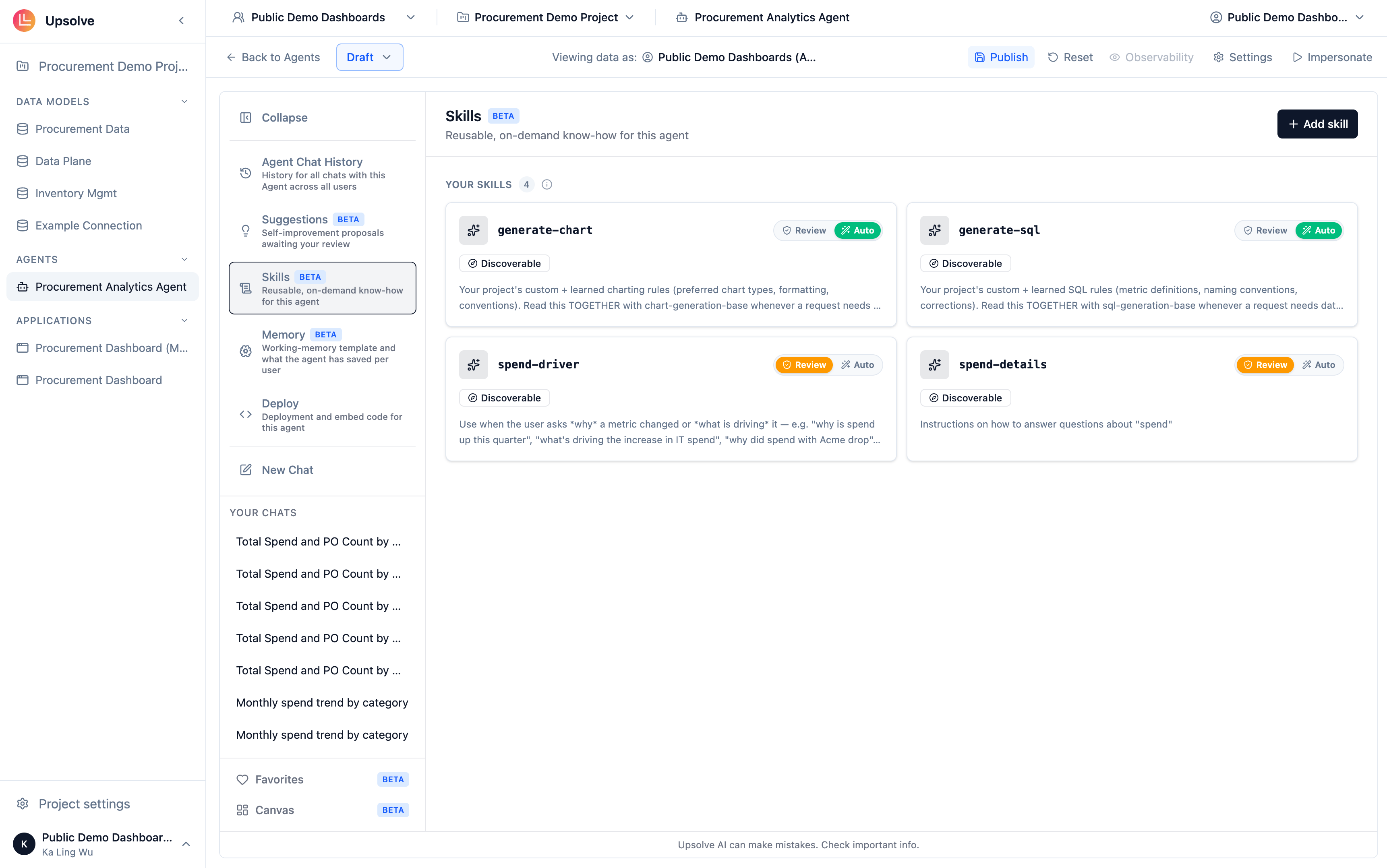
Open your agent and go to the **Skills** tab, then click **Add skill**. Every skill has three parts:
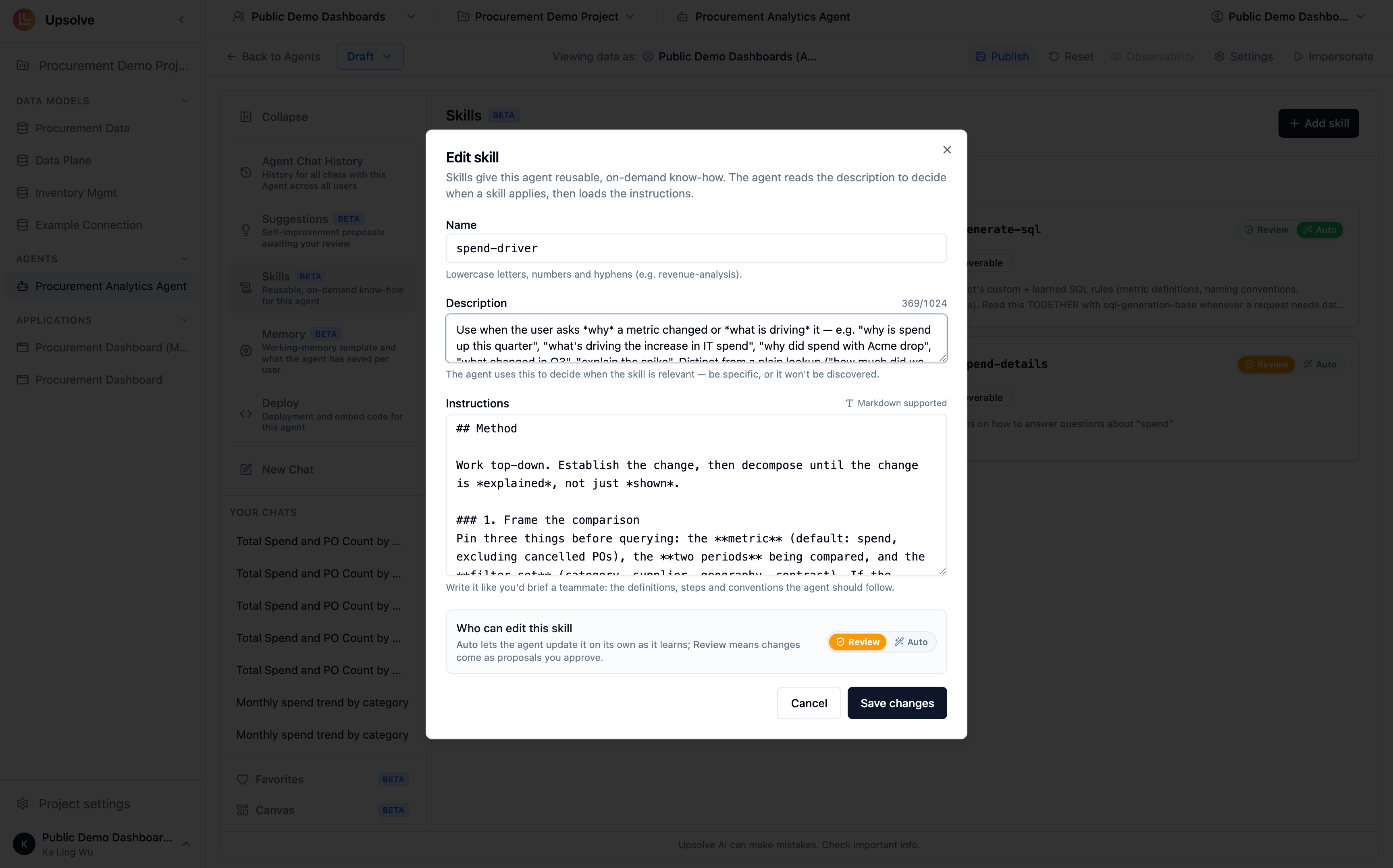
**Name** — a lowercase, hyphen-separated slug that identifies the skill, e.g. `revenue-analysis` or `cohort-retention`. Names must be unique within the agent.
**Description** — one or two sentences on what the skill covers and when to use it. This is what makes the skill *discoverable*: the agent reads descriptions to decide whether a skill is relevant to the user's question before loading its instructions. Write it the way you'd answer "when should I reach for this?"
**Instructions** — the markdown body the agent works from once the skill is loaded: definitions, step-by-step procedures, formulas, and conventions. This is where the detail lives, because it only enters the agent's context when needed.
## Anatomy of a skill
Open your agent and go to the **Skills** tab, then click **Add skill**. Every skill has three parts:
**Name** — a lowercase, hyphen-separated slug that identifies the skill, e.g. `revenue-analysis` or `cohort-retention`. Names must be unique within the agent.
**Description** — one or two sentences on what the skill covers and when to use it. This is what makes the skill *discoverable*: the agent reads descriptions to decide whether a skill is relevant to the user's question before loading its instructions. Write it the way you'd answer "when should I reach for this?"
**Instructions** — the markdown body the agent works from once the skill is loaded: definitions, step-by-step procedures, formulas, and conventions. This is where the detail lives, because it only enters the agent's context when needed.
 ### What good instructions look like
Structure instructions so the agent can scan them quickly. A proven shape:
* **When to apply** — the trigger conditions, restating and sharpening the description
* **Definitions** — the precise meaning of every term the procedure uses
* **Steps** — the procedure itself, in order, with formulas and edge cases spelled out
## Loading modes
Every skill carries a loading mode, shown as a badge on its card:
| Badge | Behavior |
| ---------------- | ------------------------------------------------------------------------------------------ |
| **Discoverable** | The agent loads the skill on demand, when its description matches what the user is asking. |
| **Always read** | The agent reads the skill on every message, not just when the description matches. |
Skills you create are **Discoverable** — this is what keeps skill-based context lean, since a skill's full instructions only enter the agent's context when its description says they're relevant.
## Who can edit a skill
Skills can improve over time, and the **Who can edit** setting controls how:
* **Auto** — the agent updates the skill itself as it learns from conversations.
* **Review** — the agent proposes changes, and you approve them before they take effect.
Relatedly, skills don't only come from you. A skill marked **Learned** was proposed by the agent's self-improvement and approved by a builder — it wasn't hand-written. Review learned skills the same way you'd review a colleague's: the agent is good at spotting a repeated pattern, you're the judge of whether it should be codified.
Skills apply to **every user** of the agent — there is no per-user tier. For preferences that adapt to individual end users, see [User Memory](/ai-agent-builder/user-memory).
## When changes take effect
Skills take effect on the agent's **next chat message** — there's no republish step for skill edits.
## Next steps
Store reference documents the agent searches on demand to interpret your terms and policies.
Let the agent record and apply each end user's presentation and style preferences.
Encode always-on business rules and behavioral guardrails.
Connect external tools and live systems as additional context for the agent.
### What good instructions look like
Structure instructions so the agent can scan them quickly. A proven shape:
* **When to apply** — the trigger conditions, restating and sharpening the description
* **Definitions** — the precise meaning of every term the procedure uses
* **Steps** — the procedure itself, in order, with formulas and edge cases spelled out
## Loading modes
Every skill carries a loading mode, shown as a badge on its card:
| Badge | Behavior |
| ---------------- | ------------------------------------------------------------------------------------------ |
| **Discoverable** | The agent loads the skill on demand, when its description matches what the user is asking. |
| **Always read** | The agent reads the skill on every message, not just when the description matches. |
Skills you create are **Discoverable** — this is what keeps skill-based context lean, since a skill's full instructions only enter the agent's context when its description says they're relevant.
## Who can edit a skill
Skills can improve over time, and the **Who can edit** setting controls how:
* **Auto** — the agent updates the skill itself as it learns from conversations.
* **Review** — the agent proposes changes, and you approve them before they take effect.
Relatedly, skills don't only come from you. A skill marked **Learned** was proposed by the agent's self-improvement and approved by a builder — it wasn't hand-written. Review learned skills the same way you'd review a colleague's: the agent is good at spotting a repeated pattern, you're the judge of whether it should be codified.
Skills apply to **every user** of the agent — there is no per-user tier. For preferences that adapt to individual end users, see [User Memory](/ai-agent-builder/user-memory).
## When changes take effect
Skills take effect on the agent's **next chat message** — there's no republish step for skill edits.
## Next steps
Store reference documents the agent searches on demand to interpret your terms and policies.
Let the agent record and apply each end user's presentation and style preferences.
Encode always-on business rules and behavioral guardrails.
Connect external tools and live systems as additional context for the agent.