

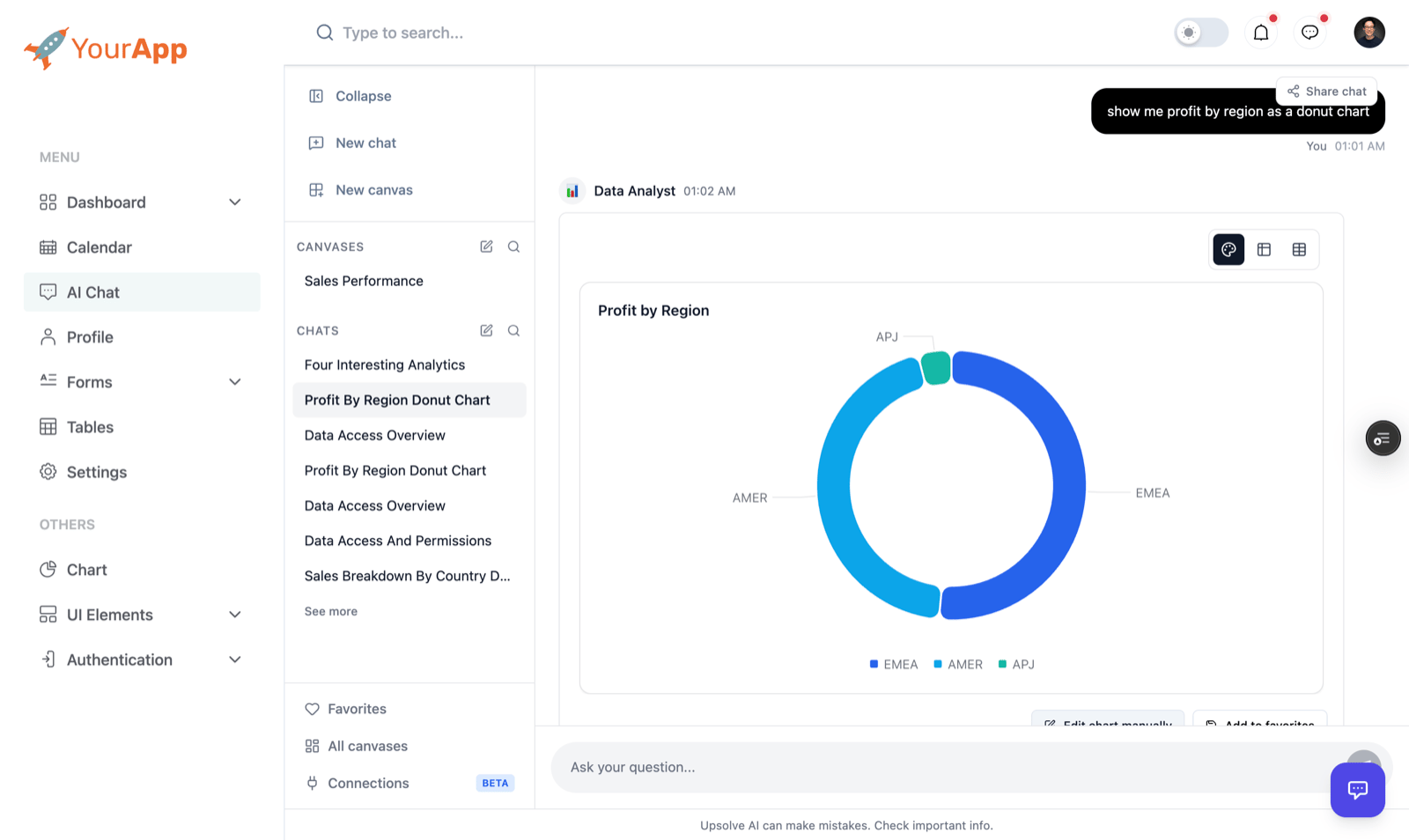
What your users get
- An analytics agent to ask. Questions in plain English, answered with charts, tables and a written summary, using all the context, tests and rules you set up in the workspace.
- Their own conversations. Past chats stay in the side panel, so they can pick one back up. They can also share a chat.
- Favorites. Any answer can be saved with Add to favorites, and opened again later.
- Canvases. Dashboards they build from their saved answers, plus any canvas you share with all your users. See Embed Canvases.
- Their own data, always. Every answer and chart runs under the data governance rules you set, with the properties you send when they sign in.
Two ways to embed
Most products want the workspace embed. To give every customer the same dashboard with their own numbers, build it as a canvas and share it inside the workspace embed: see Embed Canvases.
How it works
It takes three things:- An API key, kept on your server.
- One backend call per sign-in —
POST /v1/api/projects/embed-token— which returns a token for the user. - An iframe that carries the token.
Set it up with an AI coding assistant
The fastest way: open your workspace’s Deploy page in Upsolve, click Create an API key, and copy the Setup prompt. It already contains your organization, project and workspace ids and the exact properties your row-level security reads. Paste it into Claude Code, Cursor or any coding assistant working in your product’s codebase. Or copy this one and replace the values in angle brackets — all of them are on the Deploy page:Setup prompt
1. Get an API key and your ids
- API key. In Upsolve, open Account settings → Developer (ai-hub.upsolve.ai/account/settings?tab=developer) and generate a key. Store it on your server, for example as
UPSOLVE_API_KEY. It must never reach the browser. - Ids. A workspace’s Deploy page lists the Organization ID (your Upsolve organization), Project ID and Workspace ID, each with a copy button. An application’s id is on its Deploy panel.
2. Sign your users in
Callembed-token from your backend whenever a user opens a page with the embed. The first call for a customer creates them as a project organization, the first call for a user creates them as a project user, and every later call finds the same rows by your ids and merges in the properties you send. A call that changes nothing writes nothing, so there is nothing to register in advance and nothing to store.
Response
The same call in Node:
token and expiresAt to the browser.
3. Embed the iframe
- Workspace (AI chat)
- Application (legacy)
- URL-encode the token.
- Fetch a new token once about 80% of its lifetime has passed (never sooner than 30 seconds) and set it as the new
src. That reloads the embed; a workspace keeps the user’s conversation history. To replace it without a reload, use token handoff. - If your app sends a
Content-Security-Policy, addhttps://ai-hub.upsolve.aitoframe-src.
Row-level security
The properties you send are what the workspace’s or application’s row-level security rules filter on. A rule like{{organization.tenant_id}} is replaced with organization.properties.tenant_id, and {{user.<key>}} with user.properties.<key>. The Deploy page’s setup prompt lists the exact keys your production rules read. Write the rules in the workspace’s Data Model — see Data Governance — and check them by signing in as users of two different customers.
A property the rules read but the user does not have makes the query fail rather than return everything.
Reserved user properties
One user property name means something to Upsolve beyond RLS:
Send
email for every user who should be able to receive these emails. A rule that emails the person it acts for does not send for a user whose email is missing, empty or not one valid address: their button says so instead. Upsolve never takes the address from a row of data or from what a user types, so the only way to change where it goes is to change this property. You can still use email in RLS as {{user.email}}.
Database-native RLS (Postgres, Redshift, Supabase)
Database-native RLS (Postgres, Redshift, Supabase)
If your database enforces row-level security itself, pass the value its policies read as
dbAuthToken on an application embed: …/share/application/<APPLICATION_ID>?jwt=<token>&dbAuthToken=<value>. For Postgres and Redshift it is the value your session variable expects (a tenant or user id); for Supabase it is the user’s session access token (supabase.auth.getSession()). See RLS & Schema Filtering.Environments
A project can have environments besides production (staging, say), each serving its own deployed version of the workspace on its own databases. You manage them under Project settings → Environments; see Environments for how they work. A user’s environment decides which one they get, and the sign-in call names it:
- Production is the default. A production integration leaves the field out.
- The same
externalIdin another environment is a separate organization, with its own users and properties, so your staging build can sign in with production’s tenant ids. - It is fixed when the organization is first created. A user is always in their organization’s environment, and a later call never moves anyone. To move an organization and its users, edit it in Upsolve and use Move to environment.
- Send it from the deployment it belongs to. Read it from that deployment’s server config (for example
UPSOLVE_ENVIRONMENT) rather than hard-coding it, so your production deployment leaves it out. - An environment serves nothing until a version is deployed to it, from the workspace’s Deploy to… menu. Until then its users’ embed shows an error, never production’s version.
environment for it.
Keep the token out of the URL
A token in?jwt= is written to every access log between your user and Upsolve. With token handoff the iframe asks your page for it over postMessage instead, and a refreshed token replaces the old one without reloading the embed. It works on /share/workspace, /share/application and /share/dashboard.
Open the iframe with tokenHandoff=true and your page’s origin, and no jwt:
embed:set-token again with a fresh token before expiresAt to replace it in place. The iframe accepts a token only from the declared parentOrigin and its own parent window, keeps it in memory only, and shows No token received from the embedding page after 15 seconds without one. The full protocol — live filter sync and auto-height included — is in iframe messaging.
Iframe options
- Workspace (AI chat)
- Application (legacy)
Troubleshooting
Lower-level endpoints
embed-token does in one call what register-organization, register-user and user-token do in three. Those still work, for integrations that manage Upsolve’s ids themselves; a token from user-token goes in the iframe the same way.
To let the chat call your own API as the signed-in user, using the same properties you send here, see Let Upsolve act as your users.