

spend metric grouped by category, so the number the agent gives is the number your dbt project defines — not a fresh SQL guess at what “spend” means.
How it works
- Your workflow’s
dbt parsewritestarget/semantic_manifest.json. - Each sync stores that manifest against the workspace version it publishes. The sync summary counts them (
13 tables, 24 metrics). - When a question calls for a metric, the agent searches the version’s metrics by name, label and description, then asks for one with the breakdown, filters and order it needs.
- MetricFlow compiles the SQL. Upsolve does not reinterpret your metric. The compiled SQL then runs like any other agent query, so row-level security and the data model’s column list still apply.
Write metrics the agent can find
The agent finds a metric by its words, so the same habits that make a metric readable for people make it findable:label— the name people use. The agent matches it first.description— what is in and out of the number, and the default period when none is asked for. This is the context that stops “active suppliers” being read as a status flag.- Dimensions on the semantic models — everything you want to slice by. What a metric can be grouped by comes from MetricFlow, and the Metrics page shows the count for each metric.
The Metrics page
In a connected workspace, Repository → Metrics lists the metrics of the production version: what the agent answers from right now. Each shows its type, how many names it can be grouped by, and its definition as MetricFlow parsed it. The page is read-only; change a metric in the repository and merge.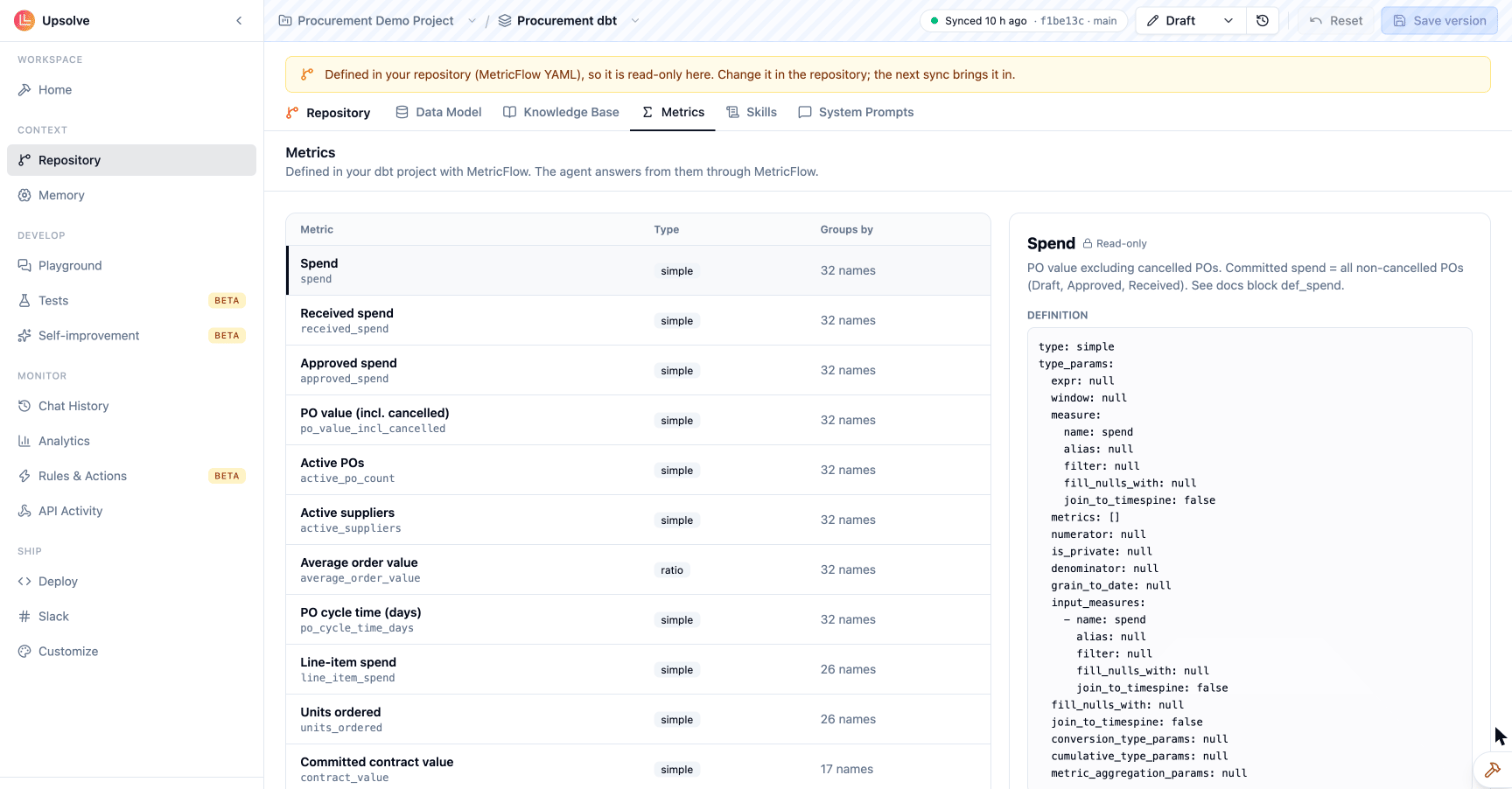
Alongside metrics written in Upsolve
Metrics become owned by the repository once a sync finds MetricFlow metrics in it. Until then, the workspace’s Metrics page works as it does in any workspace. If a dbt metric and a metric written in Upsolve have the same name (gross_margin and gross-margin are the same name), the dbt metric wins: the repository is the workspace’s source of truth.
Limits
- The Builder Agent can’t propose metric changes. Edit the MetricFlow YAML yourself.
- Only metrics the dbt Semantic Layer defines are read. Metrics computed elsewhere (a BI tool, a dbt model that is just a table of numbers) are tables like any other.
- MetricFlow compiles metrics for Postgres (and Supabase and Timescale connections), Redshift, Snowflake, BigQuery, Trino and Athena. A workspace on ClickHouse, SQL Server or Microsoft Fabric still syncs its dbt models, prompts, skills and knowledge base, but the agent cannot answer from its MetricFlow metrics.
- When users must only see their own tenant’s rows, declare row-level security in
upsolve.yml: the sync then refuses any model behind a measure that nothing filters. Addrequire_on_factsto insist that each has a condition of its own.